
Alliance Portal
Alliance Portal
Every brand and technology alliance relationship, funded and reconciled in one place.
An alliance portal is where an organization manages the relationships that flow money and support in from brand and technology alliance partners, rather than revenue going out through resellers. It covers MDF and co-op funds, co-branded campaigns, claims and proof-of-performance, MOU commitments and rebate programs as one live record across every brand relationship.
- Example 01
- Brand Directory
- Example 02
- MDF & Fund Pools
- Example 03
- Co-Branded Campaigns
- Example 04
- Claims & Proof-of-Performance
- Example 05
- Alliance Reporting
Key takeaways
What the ZINFI Alliance Portal delivers
- See every brand relationship, fund balance, and MOU commitment in one directory
- Submit a co-branded campaign and a claim without a separate email thread
- Track proof-of-performance and payout status on every claim filed
- Approve or reject claims against MOU terms and fund-pool balances directly
- See fund burn, MOU burn, and leakage across the whole brand portfolio at once
- Reconcile rebates and payments against what was actually approved and paid
ALLIANCE PORTAL
Every brand relationship, funded and reconciled in one place.
An alliance portal replaces the claims inbox and shared spreadsheet most organizations use to run brand and technology alliance funding. Brands get one place to see fund balances, submit co-branded campaigns, file claims with proof-of-performance, and track MOU commitments — and the alliance team gets one place to see all of it, reconciled.
4 portal types. 1 architecture. Alliance is where ZINFI URM runs the relationships that fund a program instead of the ones that sell it.
How each example works
Example 01
See every brand relationship in one directory
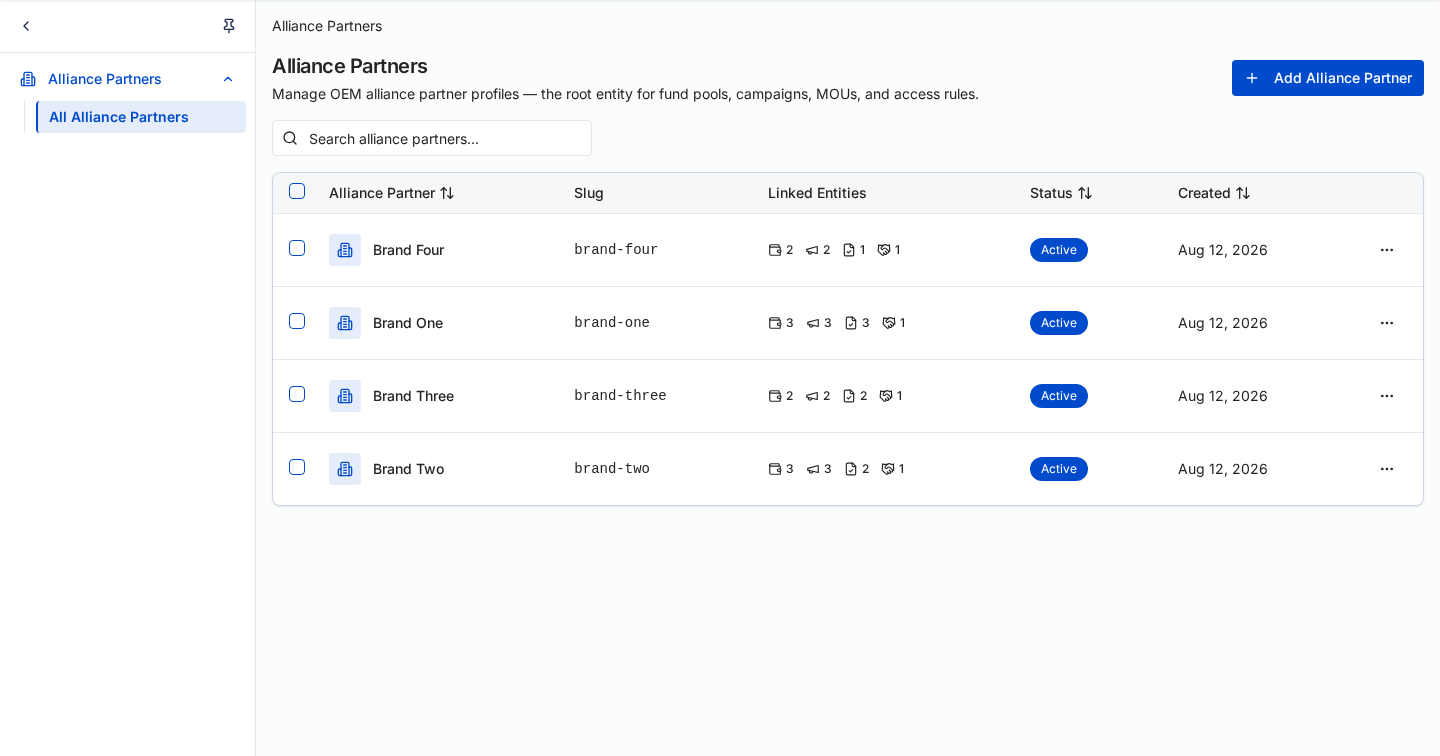
Every brand relationship in one list, with tier, fund balance, active campaigns, MOU status and days remaining on the agreement on the row. An alliance program manager sees which agreements are close to expiry instead of reconstructing the relationship from a claims inbox.
- Tier, fund balance, and active campaign count on every brand row
- MOU status and days remaining on the agreement flag expiry before it bites
- Open a brand record for its full fund, activity, and claim history
One directory for every brand relationship, instead of a folder per brand.
zinfi.app · Alliance · Brands
 Unified Revenue Management
Example 02
Allocate MDF and know exactly what's unlocked
MOU commitment, spend utilization, the bookings gate and an append-only audit log in one screen. Rewards release as booking thresholds are reached, so an alliance program manager always knows what is committed, what is spent, and what is still locked.
- MOU tier, total commitment, spend utilization, and measurement period in one header
- Bookings-gate milestones release reward value at each threshold, reached or pending
- Linked campaigns, linked fund pools, and an append-only allocation audit log
Fund balances stop being a question someone has to answer manually.
zinfi.app · Alliance · Funds
Unified Revenue Management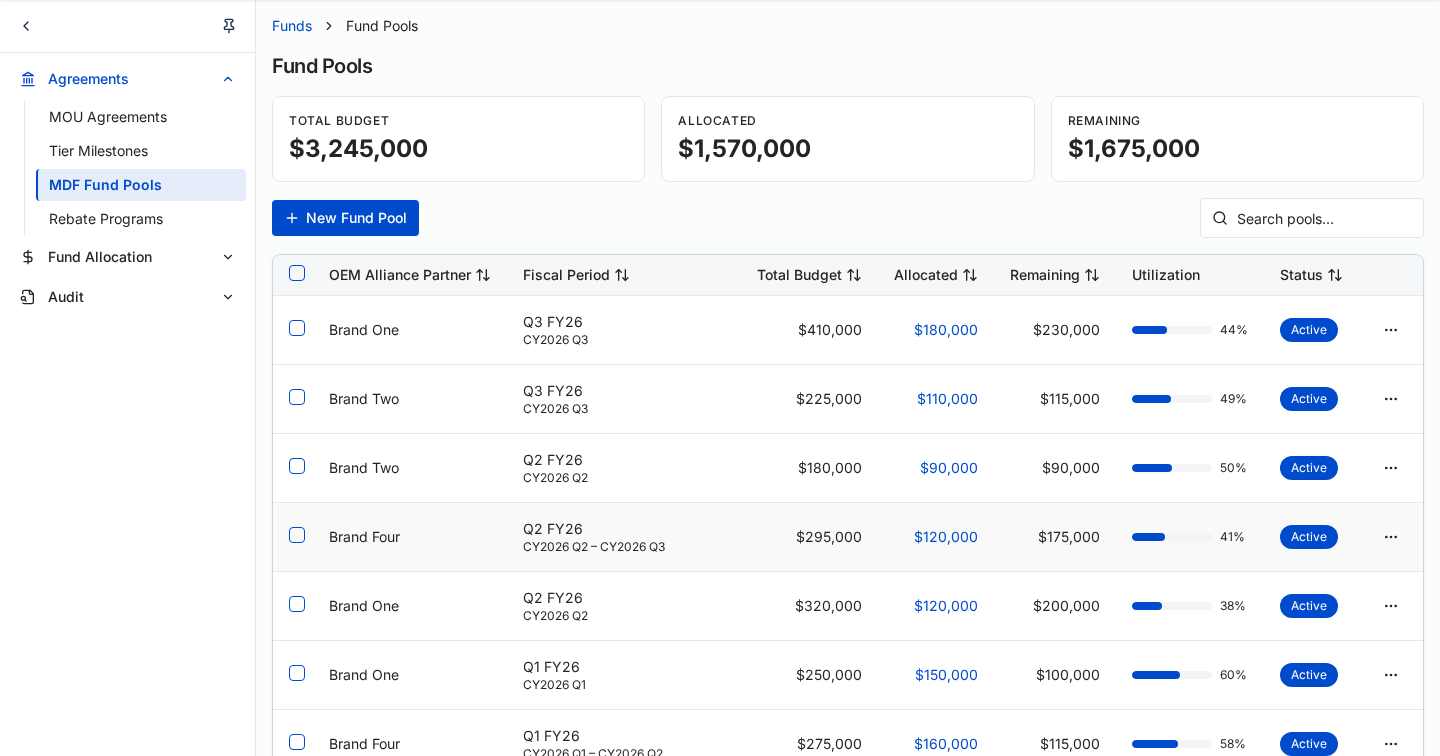
Example 03
Run every MOU activity type from one workspace
Every co-branded activity is typed as Seminars & Events, Demonstrations, POC/POV, Training or Campaigns, and carries its own budget and approval state. Budget rolls up by activity type, so the alliance team can see where committed spend actually goes.
- Activities typed as Seminars & Events, Demonstrations, POC/POV, Training, or Campaigns
- Committed budget rolls up by activity type across every brand
- Batch-approve straightforward activities instead of opening each one
Committed spend is visible by activity type before approval, not after the quarter closes.
zinfi.app · Alliance · Campaigns
Unified Revenue Management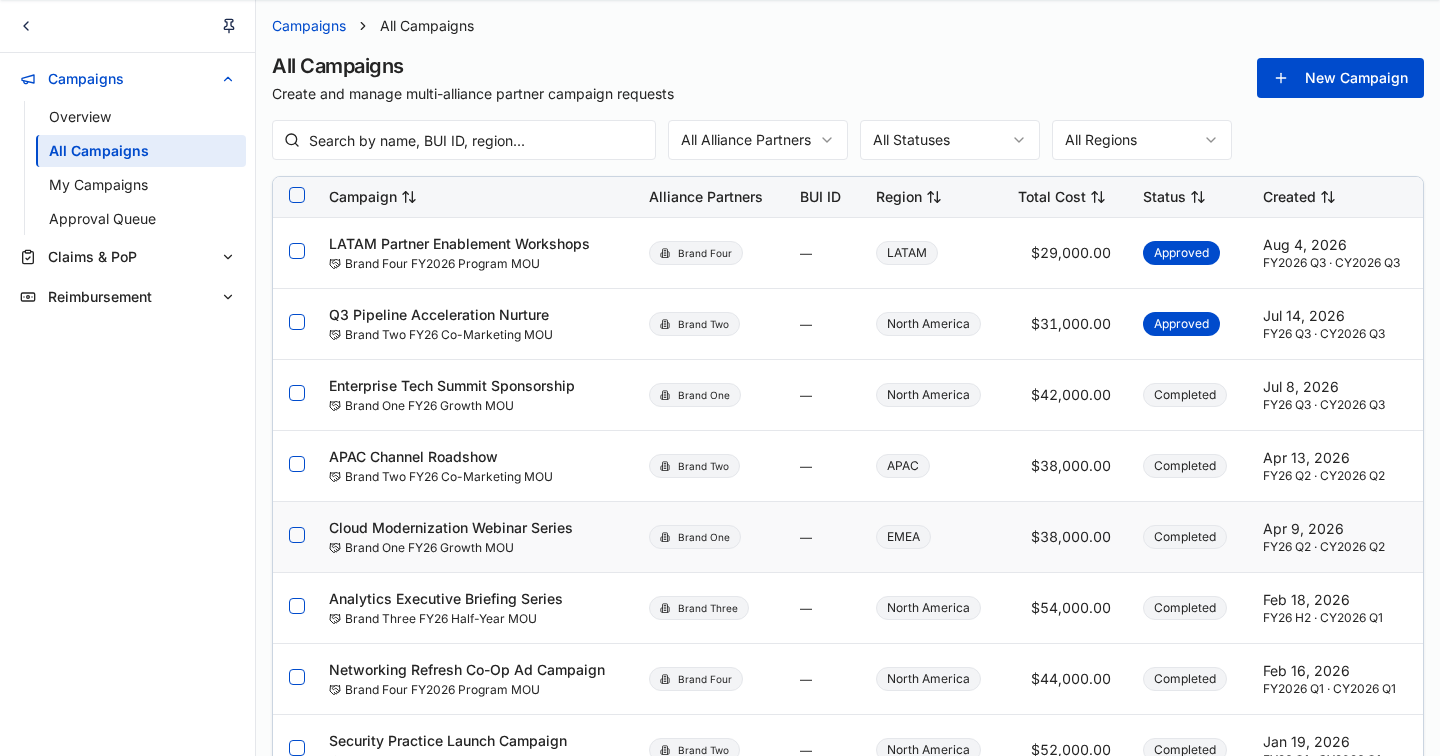
Example 04
Follow a claim from campaign to payment
The full reimbursement flow on one record: create a campaign from an MOU activity, execute the program, collect proof-of-performance documentation, submit the claim, the alliance partner reviews and approves, and payment is issued. Each stage shows its own status against the fund pool the payout draws from.
- Six-stage flow — campaign, execution, proof of performance, claim, review, payment
- Evidence files, claim amount, and remaining fund balance shown side by side
- Payment log ties every payout back to its claim, activity, and fund pool
A claim gets paid on evidence attached to the record, not on trust in an email.
zinfi.app · Alliance · Claims
Unified Revenue Management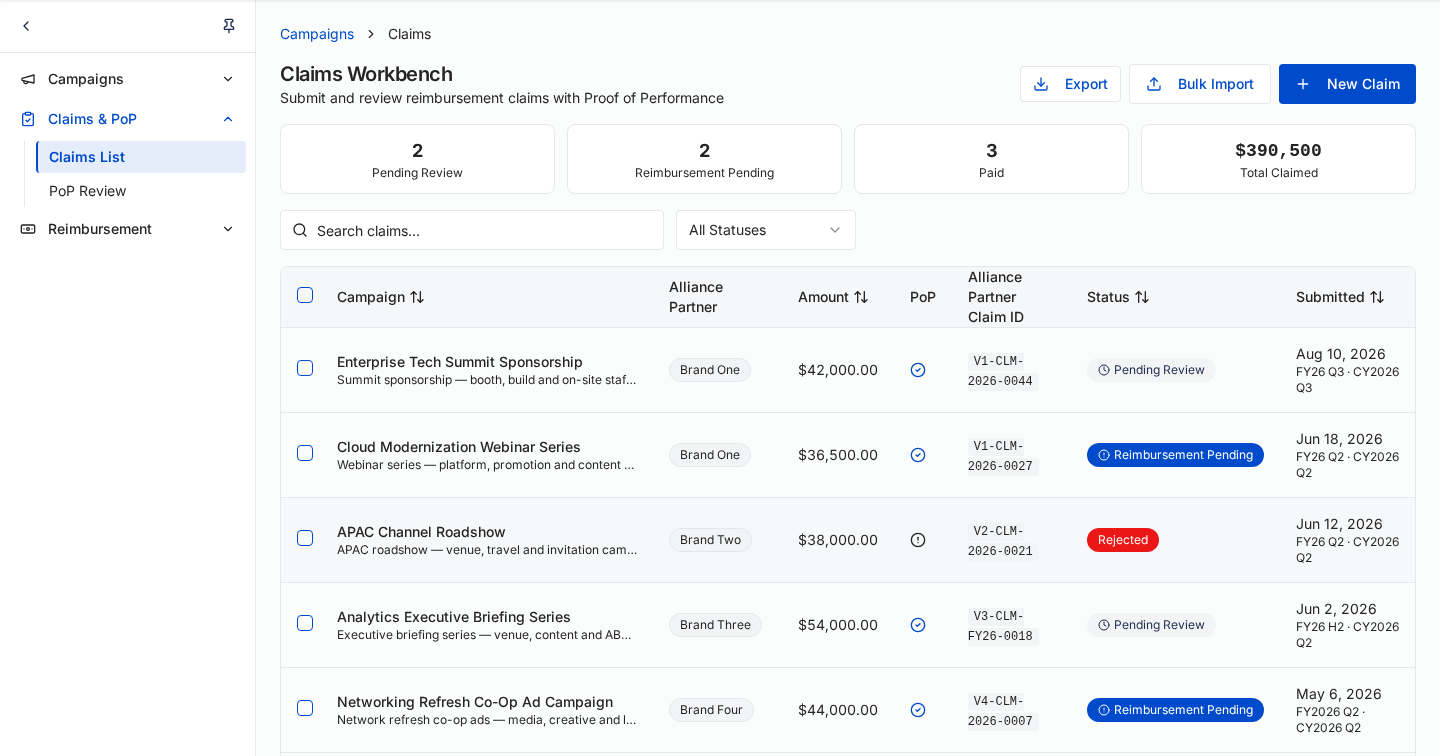
Example 05
See MDF performance across every brand at once
Total MDF budget and how much is burned, actual spend and what remains, claim velocity against the 45-day target, and the pools expiring within 15 days. An alliance program manager sees money at risk before the quarter closes, not after.
- Total MDF budget with percentage burned, and actual spend with dollars remaining
- Claim velocity in days, measured against a 45-day service target
- Expiring funds at risk — pools within 15 days of expiry, with the dollars exposed
Portfolio-level visibility replaces a brand-by-brand guess at where the money went.
zinfi.app · Alliance · Reports
Unified Revenue Management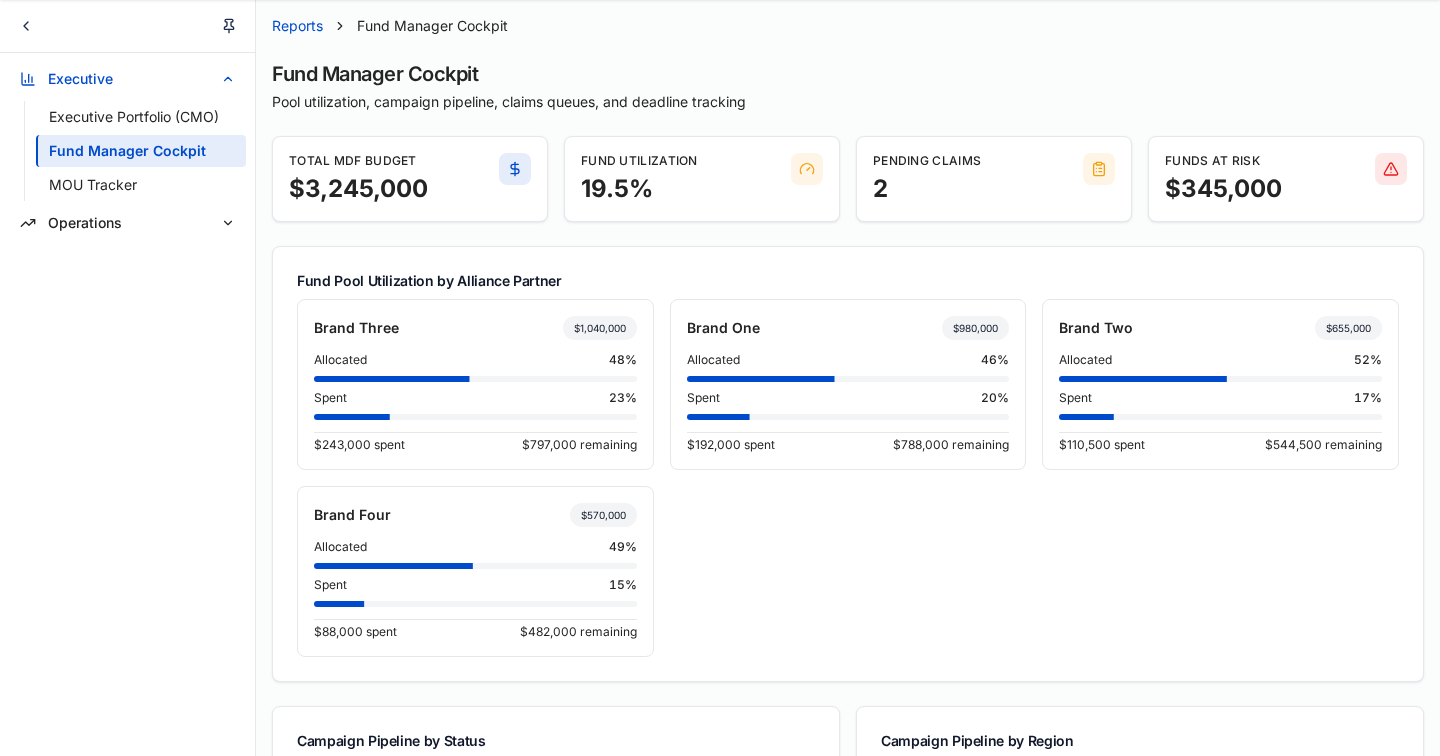
WHAT THIS UNLOCKS
What Alliance Portal unlocks for the program
A working brand-alliance operation in one system — a brand directory, MDF and fund-pool management, co-branded campaign submission, claims with proof-of-performance review, and portfolio-wide burn and reconciliation reporting — replacing the claims inbox and shared spreadsheet most alliance programs still run on.
The examples above are illustrative — built to show the portal's core screens and how they work together, not a full walkthrough of every feature. For a detailed look at the platform, schedule a live demo.
Built on ZINFI URM
- MDF
- Rebates
- Programs
Frequently asked questions
Straightforward answers about ZINFI's Alliance Portal — how it's built, who uses it, and how it differs from running brand funding over email and spreadsheets.
- What is an alliance portal?
- An alliance portal is the system an organization gives its brand and technology alliance partners to manage funding and joint programs in one place. It typically covers a brand directory, MDF and co-op fund pools, co-branded campaign submission, claims with proof-of-performance, MOU commitments, and rebate reconciliation. Rather than a brand emailing a claim spreadsheet and waiting for a reply, both sides work from the same live record. In ZINFI's architecture, an alliance portal runs on the same Experience, Connectivity, Orchestration and Harness layers as every other portal type.
- Who is an alliance portal built for?
- Two audiences use an alliance portal day to day. A brand partner contact — the brand's own program or channel staff — logs in to check fund balances, submit a co-branded campaign, and file a claim with proof-of-performance attached. An alliance program manager uses the same portal, or an admin view of it, to approve claims against MOU terms, allocate fund pools, and see burn and reconciliation across every brand relationship at once.
- How does an alliance portal fit into ZINFI's URM architecture?
- An alliance portal is built entirely on ZINFI's URM architecture — it doesn't have its own separate stack. The Experience layer renders its screens; Connectivity carries data in and out through MCP, Zapier, or ZINFI's native connector; Orchestration holds the shared brand, fund, and claim data; and the Harness governs what any automation or agent is allowed to do inside it. Nothing about an alliance portal is bespoke at the infrastructure level — only the screens and the data model are specific to brand alliances.
- What can a brand partner contact do in an alliance portal?
- A brand partner contact uses an alliance portal to run their side of the relationship: checking what a fund pool or MOU still has available, submitting a co-branded campaign for approval, and filing a claim with the proof-of-performance a payout requires. Rather than emailing a program contact and waiting, they see status directly.
- What can an alliance program manager do in an alliance portal?
- An alliance program manager uses an alliance portal to run the program itself — allocating fund pools, approving or rejecting claims against MOU terms and proof-of-performance, and reading fund burn, MOU burn, and rebate reconciliation across the whole brand portfolio. It's the same portal a brand logs into, viewed from the program-management side rather than the individual-brand side.
- How does an alliance portal connect to other systems?
- An alliance portal connects outward through the same three channels every ZINFI portal uses: Zapier for CRM, marketing, and finance systems most organizations already run; MCP for structured exchange with AI agents and tools; and ZINFI's own native connector for platform data. Which channel a given integration uses depends on what's on the other end, not on anything specific to alliance portals.
- How is an alliance portal different from running brand funding over email and spreadsheets?
- A claim tracked in email and a fund balance tracked in a spreadsheet drift apart the moment either side makes a change the other hasn't seen — and a payout decision made in a reply-all thread leaves no record anyone can point to later. An alliance portal replaces both with one live record of fund balances, claims, and MOU terms that brand and program teams read from and write to together, governed by the same Harness that applies across the rest of ZINFI's architecture.
- Can an alliance portal be customized for our organization?
- Yes — the screens, personas, and program-specific fields in an alliance portal are the customizable layer. What doesn't change is the underlying architecture: every alliance portal ZINFI builds still runs on the same Experience, Connectivity, Orchestration, and Harness foundation, which is what keeps a customized portal from becoming a one-off system nobody else can maintain.
- Is an alliance portal AI-native?
- Yes, in the same sense the whole architecture is: agentic AI is built into the platform, but it operates inside the Harness, which governs what any agent is allowed to do before it acts. An alliance portal doesn't bolt AI on top of a static system — the governance is structural, not an add-on.
- Is an alliance portal part of ZINFI Unified Revenue Management (URM)?
- Yes. An alliance portal is one of the portal types built on ZINFI's Unified Revenue Management (URM) architecture, alongside partner, sales, and customer portals. Where those three run the relationships an organization sells through and to, the alliance portal runs the relationships that fund a program from the brand side — the same architecture applied to money and support flowing in rather than revenue flowing out.
- How long does it take to stand up an alliance portal?
- Because the Experience, Connectivity, Orchestration and Harness layers already exist, the work is configuration rather than construction — defining fund pool structures, MOU terms, and claim approval rules. Organizations typically start with one or two brand relationships, then widen scope once the first fund pool and claim cycle are live, rather than onboarding the whole brand portfolio at once.
- How much autonomy do the AI agents in an alliance portal have?
- Exactly as much as you set. The autonomy ladder runs Foundation, Assist, Act and Autonomous, and each step is chosen by you rather than by the platform. At Foundation nothing acts on its own; at Assist an agent drafts and a person approves; at Act an agent completes bounded tasks inside the Harness; at Autonomous it runs an end-to-end flow within the same guardrails. Starting at Foundation is a legitimate place to run a program from.
See how this architecture handles your other portal types.
Every portal type in this showcase — partner, sales and customer — runs on the same foundation.
Browse all portal types